

BrDR Spotlight – California Department of Transportation
June 24, 2025Most users understand that AASHTOWare BrDR provides a comprehensive solution for a vast majority of the national bridge inventory, but not all take advantage of some of the nuanced features of the software. This spotlight article highlights one transportation agency’s effective use of the software features to aid their bridge load rating process and how one of BrDR’s lesser-used features aids the process to effectively manage their bridge analysis inventory.
We recently discussed this topic with Igor Chernioglo, PE, a Bridge Load Rating Engineer for the California Department of Transportation (Caltrans). Igor, a long-time user and advocate for the AASHTOWare BrDR software, described how the software is a vital tool for the daily process of bridge rating and how he and a fellow Bridge Load Rating Engineer at Caltrans, Sergey Markevich, PE use this feature of the software to facilitate the process. Sergey also serves on the BrDR API TAG.
Igor:My position is load rating engineer within Caltrans Structure Maintenance and Investigations (SM&I) and I act as the point of contact for BrR, which is used extensively by our rating unit, and as BrR liaison to our design unit, who utilize BrR for load rating verification when modifying existing structures and to a lesser extent BrD for design of new structures. I began my work in the Caltrans load rating unit in 2017 at which time I became first exposed to BrR. Since then, I have been involved in the Analysis, Backlog, Design, Reports, and Testing TAGs to contribute to the improvement of the software.

Sergey Markevich, PE

Igor Chernioglo, PE
Tell me a little about yourself, how you became involved with AASHTOWare, and how long you have been using the software.
How does Caltrans use BrDR?: Caltrans has a process for inputting and rating bridges in BrR which is part of our overall process where an engineer pulls the necessary data from as-built drawings and inspection reports and creates a BrR model. We utilize a quality control checklist that is contained in an appendix of the Caltrans Structure Maintenance & Investigation Bridge Load Rating Manual (SM&I) that is completed by the ‘rater’ (LRE) of the bridge and is reviewed by a ‘checker’ (LRC). Before finalizing the rating, the load rating package is reviewed and signed off by a senior level engineer.
The checklist includes:
- Making sure that the BrR bridge model follows the Caltrans model naming guidelines
- Results compared to previous load rating (if available)
- Correct control options and analysis settings are used
- Checkers comments are resolved and documented
- Entered applicable ‘Workarounds’ or ‘Girder Types’, custom agency field code.
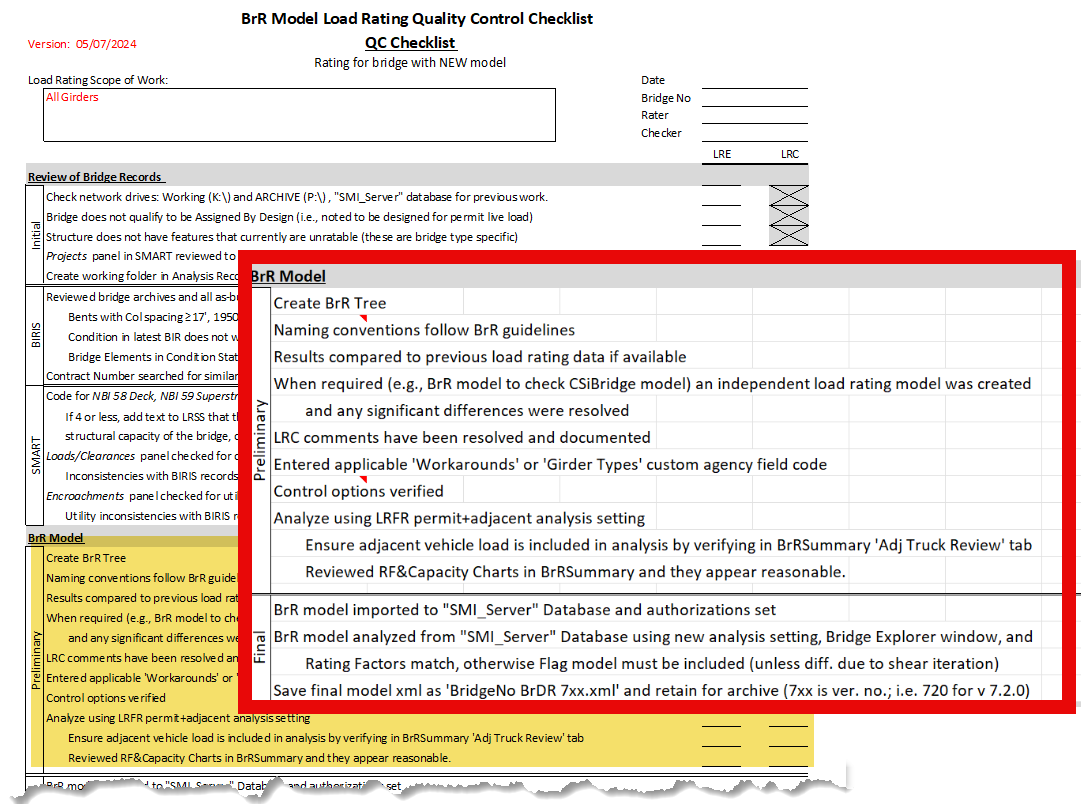
Checklist from Appendix B of the Caltrans SM&I manual
Caltrans also takes advantage of the ten custom agency fields available in BrR to define useful tags as needed. Two of these field codes are used to tag the ‘Girder Type’ and ‘Workaround’ which are then displayed in the Bridge Explorer as columns. A ‘Girder Type’ code as shown in the table is entered in each bridge model to make it easier to locate specific bridge types.
Similarly, Caltrans uses a ‘Workaround’ custom field to flag a BrR bridge model that either due to a software limitation, or special case, has a specific workaround needed . Using these workaround codes signals to future users that there is something non-standard about the bridge model and they should take a closer look. It provides a means to search for bridges with the same workaround(s) and to prioritize potential future enhancements to the software. Similar to the ‘Girder Type’ field, each ‘Workaround’ field code and explanation is documented in a separate spreadsheet available to the load raters.
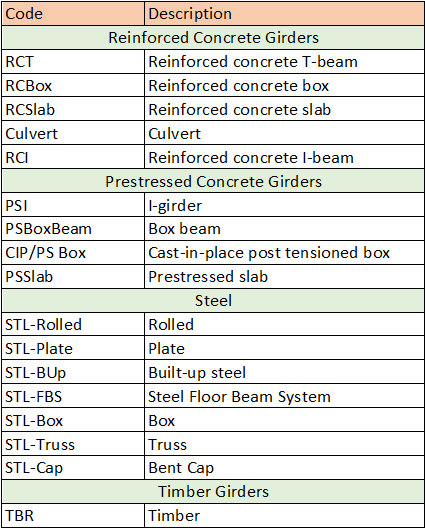
Girder Type Table
Tell me a little about how you use the software, and what works best for Caltrans.
All of the Caltrans load rating engineers have the BrR software installed locally (around 30) and use a local database for creating and modifying bridge models. A template database of is installed with every BrDR update which includes agency specific analysis settings, vehicles, materials, etc. This ensures that all engineers are using the same libraries and settings for analysis. When a new bridge model is ready, it is imported into a server database which stores all the finalized models. Access to the server database is limited to preserve its integrity. Caltrans has an inventory of just over 25,000 bridges of which about half are state bridges and half local agency bridges. Caltrans SM&I is responsible for rating about 24,000 of those bridges. To date, Caltrans has modeled just over 8,400 of those bridges in BrR.
Using the API
A unique way that Caltrans has interacted with the BrR software is by using the AASHTOWare Bridge Design and Rating .NET Application Program Interface or API. The API makes it possible to access the system’s data and functionality from many commercial software packages, including Visual Basic®, Excel®, AutoCAD®, and even Microsoft Word®.
Sergey Markevich has taken the lead in developing several external solutions for Caltrans utilizing the BrDR API. The table to the right provides a description of some of the utilities he has authored that aid in the day-to-day tasks of the load rating process, which improves production and reduces user errors. Each utility uses a simple command line prompt interface to obtain required user input and then performs the required tasks and provides the requested output. Sergey will be providing a demonstration of the API Tools at the upcoming RADBUG meeting in Boise, Idaho.
AASHTOWare BrDR is a comprehensive tool for designing, rating, and maintaining an agency’s bridge inventory. Knowing the nuances of the features can provide a more robust means to aid in that process. Thank you, Igor and Sergey for sharing ways that you do this daily!
| API Tool | Description |
|---|---|
| MCB Auto Generate | Connects to an MC B spreadsheet which contains complete bridge data and creates a fully defined BrR model. |
| RC Slab Auto Generate | Connects to an RC Slab spreadsheet which contains complete bridge data and creates a fully defined BrR model |
| Model Export | Exports xml bridge files from database using a list of bridge numbers |
| Gusset Plate | Connects to both a Gusset Plate spreadsheet and a BrR model and creates gusset plate definitions in the bridge model |
| LLDF Calc | Calculates LLDFs using BrDR calculator and populates LLDF tables |
| MCB to ACM Converter | Converts and MCB model to a Girder System ACM model |
| POI Delete | Deletes all POIs in bridge |
| Shear Iteration | For concrete bridges and for vehicles that are controlled by shear, the tool iterates the analysis of each vehicle while modifying the Scale Factor with each run until RF=1.0. The final Scale Factor is the iterated Rating Factor
Note: This feature has since been added to the BrR software. |
Caltrans API Tools